Dashes
This guide will show you how to draw dashed outlines and dashed strokes.
Every Draw and Border method takes a dash parameter. A DashStyle is defined by the length of a dash and the length of the space between dashes, both in world units:
_sb.BorderCircle(new Vector2(120, 120), 75, Color.White, 6f, dash: new DashStyle(24f, 16f));
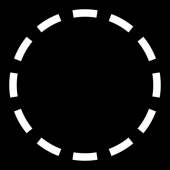
The default DashStyle draws solid, so shapes are undashed until you pass one. DashStyle.None is the same thing with a name.
Outlines and strokes
Dashes mean two different things depending on the shape.
Closed outlines (circle, ellipse, rectangle, chamfer, hexagon, equilateral triangle, and triangle) dash their border along the perimeter. The fill is left alone, so the gaps show whatever is inside:
_sb.DrawCircle(new Vector2(120, 120), 75, new Color(96, 165, 250), Color.White, 8f, dash: new DashStyle(26f, 20f));
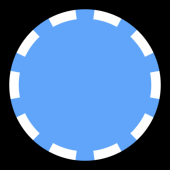
Strokes (line, path, arc, and ring) are cut into dashes along their centerline instead. Each dash comes out as its own little shape, with its own fill, its own border, and its own anti-aliased edges. This is why Fill also takes a dash on these four:
_sb.DrawLine(new Vector2(20, 40), new Vector2(400, 40), 16, new Color(96, 165, 250), Color.White, 3f, dash: new DashStyle(34f, 24f));

Size and spacing
size is the length of a dash and spacing is the length of the gap, both measured along the contour. Together they make one period of the pattern.
A spacing of 0 or less disables dashing, which is a convenient way to toggle a dash off without swapping the call.
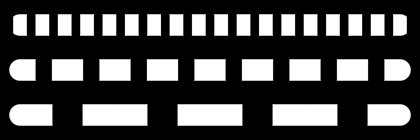
_sb.FillLine(new Vector2(20, 30), new Vector2(400, 30), 10, Color.White, dash: new DashStyle(12f, 10f));
_sb.FillLine(new Vector2(20, 75), new Vector2(400, 75), 10, Color.White, dash: new DashStyle(30f, 18f));
_sb.FillLine(new Vector2(20, 120), new Vector2(400, 120), 10, Color.White, dash: new DashStyle(60f, 30f));
Offset
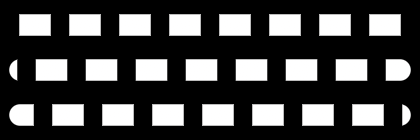
offset slides the pattern along the contour. It is measured in periods, so an offset of 1 is one full dash plus one full space and looks identical to an offset of 0. Animate it to get marching ants:
_dashOffset += (float)gameTime.ElapsedGameTime.TotalSeconds * 0.5f;

_sb.FillLine(new Vector2(20, 30), new Vector2(400, 30), 10, Color.White, dash: new DashStyle(30f, 20f, _dashOffset));
The same line at offsets of 0, 0.33, and 0.66:
Dash caps
cap picks the shape of each dash’s ends, named like the line cap styles.
Buttcuts each dash flat at both ends. This is the default.
Roundgives each dash a round cap. Where a round capped dash meets the round cap of a line or an arc, the two merge into one continuous shape.
With Round and a size of 0, each dash collapses to a single round cap and you get a dotted line:
_sb.FillLine(new Vector2(20, 40), new Vector2(400, 40), 8, Color.White, dash: new DashStyle(0f, 34f, cap: DashCap.Round));

Snapping
A pattern given in world units almost never divides evenly into a shape’s perimeter. Left alone, the last repeat gets cut short: a closed outline shows a seam where the pattern wraps, and an open stroke ends on a stub. snap says how to resolve that by stretching the period slightly so the pattern fits.
AutousesTilingon closed outlines andEndToEndon open strokes. This is the default and it is usually what you want.Offuses the pattern exactly as given. The contour may end mid dash, and on a closed outline the leftover shows up as one gap that doesn’t match the others. Here the circumference leaves a remainder, so the gap on the left is a quarter the width of the rest.
Tilingscales the period so a whole number of repeats fits. Closed outlines wrap without a seam. Open strokes start on a dash and end on a space.
EndToEndscales the period so that a dash is centered on each end of the stroke, which puts a solid dash under both caps. On a closed outline there are no ends, so it falls back toTiling. Both lines below have butt caps,Offon top andEndToEndunderneath:
Snapping only ever nudges the period, never the ratio between the dash and the gap. Because it fits a whole number of repeats, animating size or spacing pops when that number changes. You can animate offset instead, keep size + spacing constant while trading length between them, use Snap.Off on open strokes, or use a counted pattern.
Counted patterns
DashStyle.FromCount lays a whole number of repeats along the contour instead of measuring in world units. All three circles below carry exactly 12 dashes:
_sb.BorderCircle(new Vector2(55, 95), 45, Color.White, 6f, dash: DashStyle.FromCount(12, 0.6f));
_sb.BorderCircle(new Vector2(185, 95), 65, Color.White, 6f, dash: DashStyle.FromCount(12, 0.6f));
_sb.BorderCircle(new Vector2(355, 95), 85, Color.White, 6f, dash: DashStyle.FromCount(12, 0.6f));
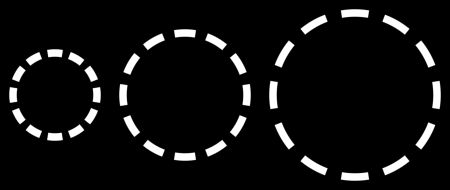
count is the number of dash + space repeats and fill is the fraction of each period the dash covers. The period is always the contour length divided by count, so there is no rounding to snap: closed outlines wrap seamlessly, a dash is centered on each end of an open stroke, and the dashes stretch continuously as the shape grows or shrinks. This is the style to use when the shape itself animates. A world unit pattern pops whenever the repeat count it snaps to changes, a counted one never does. fill animates smoothly too: at 1 it draws solid, and at 0 with DashCap.Round it collapses to dots.
Corners and joints
The pattern walks the shape rather than the screen, so it rounds every corner it crosses. A dash that lands on a corner bends through it at full width, with its cut edges staying perpendicular to the direction of travel. The dash compresses on the inside of the bend and stretches on the outside, the way tape does when you wrap it around an edge.
_sb.DrawPath([new Vector2(20, 130), new Vector2(120, 30), new Vector2(220, 130), new Vector2(320, 30)],
    12, new Color(96, 165, 250), Color.White, 3f, join: PathJoin.Miter, dash: new DashStyle(30f, 20f));
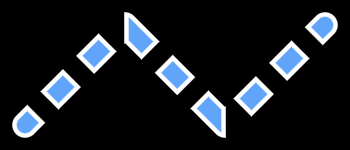
This holds for rounded rectangle corners, rounded hexagon and triangle corners, path joints, and the caps at the ends of a stroke. Miter and bevel tips appear once a dash covers the whole joint, and stay rounded off otherwise.
Varying width
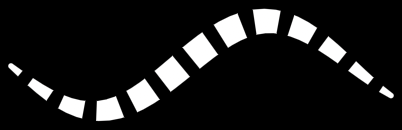
A path with a radius per point dashes the same way. The pattern walks the spine and knows nothing about the width, so each dash simply comes out as wide as the stroke is where it lands, and a rounded dash’s caps take the width at each of its two ends:
Vector2[] points = new Vector2[40];
float[] radii = new float[40];
for (int i = 0; i < points.Length; i++) {
    float t = i / (float)(points.Length - 1);
    points[i] = new Vector2(20 + t * 380, 90 + MathF.Sin(t * 7f) * 45);
    radii[i] = 2 + 11 * MathF.Sin(t * MathF.PI);
}

_sb.FillPath(points, radii, Color.White, dash: new DashStyle(22f, 14f));
Curves
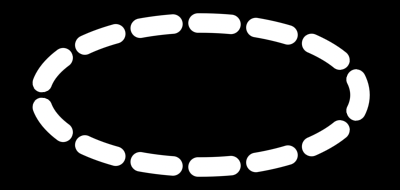
A closed path dashes seamlessly all the way around, which is also how you dash a shape the library can’t walk. Flatten the curve (a bezier, a spline, anything you can sample) into points, pass them as a closed path, and it dashes like any other loop:
Vector2[] points = new Vector2[96];
for (int i = 0; i < points.Length; i++) {
    float a = MathF.Tau * i / points.Length;
    float r = 120f + 35f * MathF.Cos(a * 3f);
    points[i] = center + new Vector2(MathF.Cos(a) * r, MathF.Sin(a) * r);
}

_sb.FillPath(points, 12, Color.White, closed: true, dash: new DashStyle(40f, 26f, cap: DashCap.Round));
Follow up
Gradients, a guide that shows how to fill shapes with gradients. A gradient spans the whole shape, so a dashed stroke picks up the colors it passes through instead of restarting on every dash.
Edit this page on GitHub