Textures
This guide will show you how to draw textures with the ShapeBatch.
The ShapeBatch implements the SpriteBatch texture API. This makes it possible to draw textures along with shapes without breaking the batch.
protected override void LoadContent() {
    _sb = new ShapeBatch(GraphicsDevice);
    _texture = Content.Load<Texture2D>("image");
}

protected override void Draw(GameTime gameTime) {
    GraphicsDevice.Clear(Color.Black);

    _sb.Begin();
    _sb.Draw(_texture, new Vector2(100, 100));
    _sb.FillCircle(new Vector2(280, 132), 75, new Color(96, 165, 250));
    _sb.End();

    base.Draw(gameTime);
}

ShapeBatch _sb;
Texture2D _texture;
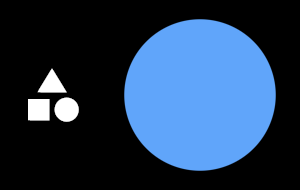
The overloads mirror the SpriteBatch ones. You can pass a destination rectangle, a source rectangle, a mask color, a rotation, an origin, a scale, and sprite effects. RectangleF comes from MonoGame.Extended:
using MonoGame.Extended;
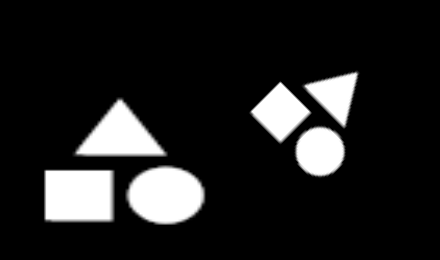
_sb.Draw(_texture, new RectangleF(100, 100, 200, 150), Color.White);
_sb.Draw(_texture, new Vector2(400, 175), Color.White, MathF.PI / 4f, new Vector2(50, 50), 2f);
World matrix
The draw calls are backed by a Matrix3x2. The matrix transforms a 1x1 quad which supports more drawing options than what the SpriteBatch provides. You can pass it directly:
_sb.Draw(_texture, Matrix3x2.CreateScale(_texture.Width, _texture.Height) * Matrix3x2.CreateRotationZ(MathF.PI / 4f) * Matrix3x2.CreateTranslation(100, 100));

One texture at a time
The ShapeBatch draws with a single texture slot, so switching to a different texture costs a draw call. Group your draw calls by texture when possible, or pack your images into a texture atlas and use the source rectangle overloads.
Text is not affected. It’s drawn from the font’s outlines, which sit in their own texture slots.
Edit this page on GitHub